

Alternative: YouTube player
The guide on YouTube
Watch this video on YouTube.
The player stays disabled until you click. Loading it connects to YouTube, which receives information including your IP address.
Watch the guide
Measure the connection near your TV, compare Wi-Fi and Ethernet, and adapt your network to your household’s needs. · 1:44
Open the dedicated video page →
Read the transcript
Your plan advertises plenty of speed. Yet the video stops. Before paying for more bandwidth, find out where the problem is. Start with your address. Fiber, cable, fixed wireless, or satellite. Availability and service characteristics vary by location. Compare the actual plan terms, not just its maximum speed. Next, test on the device you use to watch. A good result beside the router does not necessarily describe the television's connection in another room. If the device supports it, compare Wi-Fi with an Ethernet cable. Run the speed test, then stop it before playing the video. Otherwise, the test itself can occupy the connection. If the cable improves playback, examine the Wi-Fi. Distance, walls, and router placement can matter. Keep the router in an open, unobstructed space and follow its manufacturer's guidance. Test again at your usual viewing times when several devices are in use. Available bandwidth is shared. Watch for consistent playback, not just the best speed test result. Think about data, too. For example, an average stream of 10 megabits per second, two hours a day for 30 days, uses about 270 gigabytes. This calculation excludes other activities and network overhead. Actual usage varies with the content and its quality. A VPN changes the connection's route. Depending on the network and server, it may help or slow things down. Compare with and without it under similar conditions, without assuming an automatic improvement. The Official OTT approach: Measure in the right place, change one thing at a time, and record the result. Find the steps in our Internet for Streaming in Canada guide.
1. Quick answer
Start with simultaneous household uses and availability at your address. Compare plan terms, then measure the connection near the router and where you watch television. Use the seven-day test protocol to distinguish a capacity shortage, a Wi-Fi problem and a device limitation before changing plans.
There is no single provider or speed tier that is the best internet connection for every Canadian streaming household. The answer depends on the service address, access technology, number of concurrent screens, other household traffic, and the quality of the network between the gateway and each screen. A very fast plan can still buffer behind several walls or during unstable Wi‑Fi. A lower tier with consistent delivery may serve one screen perfectly well.
2. Establish the requirement before comparing plans
Model a realistically busy evening. Count concurrent video streams and their selected quality, video calls, online play, cloud backups, and large downloads. They share one connection. Leave headroom for changing video bitrates and background work; a sum made entirely from minimum requirements is too fragile.
As service-specific reference points, Apple says HD playback in the Apple TV app requires 8 Mbit/s or faster and recommends at least 25 Mbps for 4K. Those figures are not a universal standard. Codec efficiency, frame rate, HDR, and adaptive encoding all affect demand. Start with the current requirement published by the actual streaming service, then validate it in the home.
| Household | Prudent model | Validation |
|---|---|---|
| One HD screen | Service requirement plus headroom | Stability at the TV |
| One 4K screen and browsing | 4K guidance plus other use and headroom | 4K device, port, Wi‑Fi, and cable |
| Two 4K screens | Both service requirements plus headroom | Concurrent evening playback |
| Calls, games, backups, and family viewing | Observed household peak plus headroom | Upload and loaded latency |
Do not turn these scenarios into guarantees. Two platforms labelled 4K may use different rates, and adaptive services may quietly lower resolution. A concurrent household test is more useful than a generic multiplier.
3. Understand the measurements that affect playback
Download throughput
Download capacity carries video segments to the screen. When usable throughput falls below demand, the player waits or selects a lower quality. A speed test only measures capacity at one moment to a particular endpoint; it does not guarantee every content route.
Upload throughput
Viewing is mainly downstream, but calls, cameras, backups, and file uploads can fill the upstream link. Small playback control requests then queue behind the upload. An asymmetric plan may advertise a large download number while providing a much smaller upload tier.
Latency, jitter, and loss
Latency is transmission delay; most consumer ping tests report a round trip to a particular server. Jitter measures delay variation and loss means packets fail to arrive. These measurements do not equal the delay from a live event to the screen, which also includes encoding and playback buffers. Record the tool, server and idle or loaded conditions.
Consistency and availability
A useful connection must work repeatedly. Record outages, gateway restarts, and differences between morning and evening. The CRTC’s Measuring Broadband Canada project examines download, upload, and latency. Its 2024 fixed-wireless results also show why multiple performance dimensions matter rather than one headline number.
4. Compare fibre, cable, DSL, fixed wireless, and satellite
Fibre to the home
Fibre can provide substantial capacity, low latency, and strong upload performance. Confirm that fibre reaches the dwelling; marketing may describe a broader network whose final segment uses another technology. Ask for both download and upload tiers, included hardware, and Wi‑Fi conditions.
Cable
Cable commonly delivers high downstream speeds in Canadian cities. Upload may be lower, and local architecture and load can affect results. An evening trial at the service address is more informative than a national maximum.
DSL or copper access
Performance depends more heavily on loop length and line condition. A smaller plan may still be entirely suitable for one HD screen, while a multi-screen family needs careful capacity planning. Verify the tier available at the exact address rather than the provider’s broadest advertised maximum.
Fixed wireless access
An outdoor or indoor radio link connects the dwelling to the provider. Terrain, vegetation, distance, installation, and network load can matter. The CRTC found that many participants in its 2024 fixed-wireless study met advertised maximum speeds, but an aggregate result does not predict every address. Request an installation assessment and test over several days.
Satellite
Satellite can extend broadband where terrestrial options are limited. Latency, obstructions, weather sensitivity, traffic policies, data allowances, and installation differ by system. Read the current contract and confirm the required sky view. The CRTC lists its satellite measurement phase as upcoming, so do not attribute results to that phase before publication.
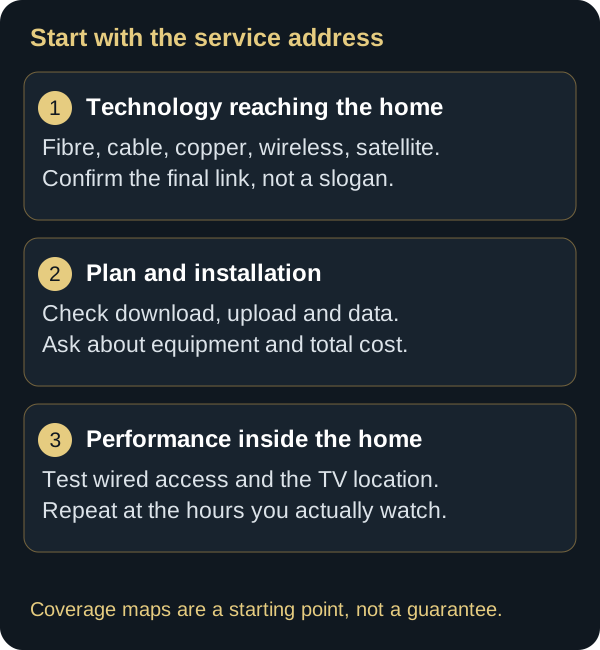
5. Verify availability at the exact service address
Innovation, Science and Economic Development Canada’s National Broadband Map shows available technologies and speed thresholds. Its data is assembled with the CRTC, providers, and public partners. Road-level coverage uses segments of roughly 250 metres, but ISED cautions that a displayed service may not reach every dwelling on the segment. Treat the map as a starting list; only an address qualification and installation can confirm service.
- Open the national map. Record candidate technologies and providers.
- Qualify the address with each provider. Request written confirmation of the tier and access type.
- Request the full price. Include equipment, activation, installation, temporary discounts, tax, and post-promotion price.
- Read the limits. Data, traffic management, term, cancellation, and hardware return.
- Keep evidence. Save the offer, order number, and date of the availability statement.
Canada’s connectivity strategy uses 50 Mbps down and 10 Mbps up as its baseline high-speed objective. That is an access policy target, not a certificate for every playback experience or a personalized recommendation. The household still needs to assess concurrent demand, Wi‑Fi, and consistency.

6. Separate internet access from the home Wi‑Fi

The provider delivers access to the modem or gateway. Wi‑Fi carries it through the home. A strong access line can be limited by a hidden router, distance, dense walls, interference, or an older client. The CRTC identifies the modem, router placement, connected-device count, and equipment condition among factors inside the home.
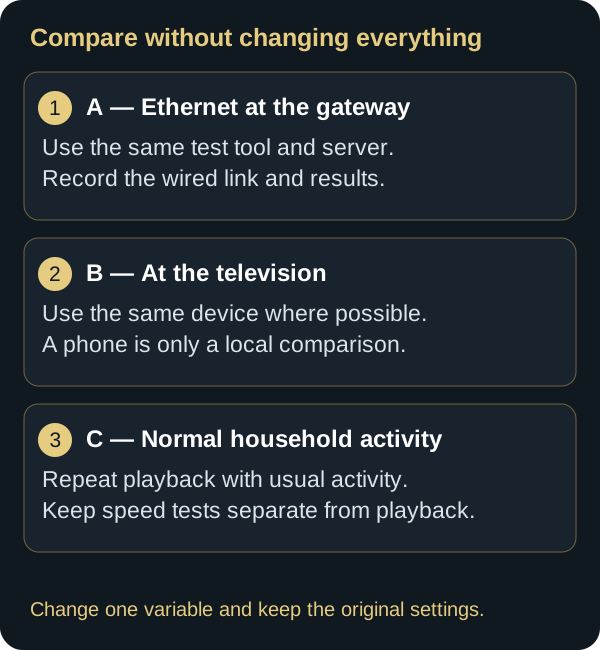
Test A: at the gateway
Use a current computer over Ethernet when feasible. Pause major transfers and run three measurements. This approximates capacity delivered to the home without claiming to measure every destination.
Test B: at the screen
Repeat on the streaming device, or a comparable client in the same location. Keep conditions unchanged. A large A-to-B difference points toward the internal network.
Test C: under normal household load
Play content while the household’s expected uses run. Record time, active devices, start delay, quality changes, and interruptions. Test the actual home, not an empty lab.
Related guide: Explore bands, range and mesh networking with the Wi-Fi 6, 6E and 7 guide.
7. Improve the network before buying more speed

- Placement: keep the gateway open, elevated, and near the centre of use; avoid metal cabinets and the immediate rear of a large display.
- Ethernet: use it for a fixed screen when practical. Its consistency also makes diagnosis easier.
- Bands: 2.4 GHz usually reaches farther; 5 GHz often provides more capacity nearby; 6 GHz requires compatible hardware and has a shorter useful reach through obstacles.
- Mesh: place nodes where they still receive a good backhaul signal. A node in a dead zone repeats a poor link.
- Updates: apply official firmware and save settings before a material change.
- Channels: automatic selection is often reasonable. Change manually only after measurement and record the original value.
Do not replace a router because one app buffers. Compare another service on the same device, the same service on another device, and temporary Ethernet. Together, those tests isolate the fault far better.
8. Read an internet plan as a contract
The CRTC Internet Code is intended to make certain contracts easier to understand and establishes rights for customers of covered large providers. Review the critical information summary, prices, term, fees, data limits, contract changes, and cancellation terms that apply. An advertisement cannot substitute for the contract.
| Item | Question | Evidence |
|---|---|---|
| Technology | What connection reaches the dwelling? | Order confirmation |
| Speeds | Download and upload? | Contract summary |
| Price | Total now and after promotion? | Dated offer |
| Data | Unlimited, allowance, or use policy? | Applicable terms |
| Hardware | Purchase, rental, return, warranty? | Equipment list |
| Installation | Fees, appointment, and work? | Installation record |
9. A seven-day acceptance test
- Day 1: photograph connections and record the plan, hardware models, and settings.
- Days 1–3: measure morning, afternoon, and 7–11 p.m., the weekday peak window used in the CRTC’s 2020 study.
- Days 2–4: test one screen, then all expected concurrent uses.
- Day 4: compare Wi‑Fi and Ethernet at the same location with no other change.
- Day 5: check captions, live playback, start, seeking, and content changes.
- Day 6: restart the gateway correctly once, only if a symptom justifies it.
- Day 7: calculate median results and compile interruption times.
A speed test is not a contest. Keep the median, range, and performance under concurrent load. One high result does not offset recurring outages.
10. Interpret common symptoms
| Observation | Check | Safe comparison |
|---|---|---|
| Every device slows | Access, gateway, or total load | Ethernet and provider status |
| One TV slows | Local Wi‑Fi, device, or app | Another client in that location |
| One platform only | Service, app, or external path | Other content and official status |
| Evening only | Household load or congestion | Peak/off-peak log |
| During backups | Upload saturation | Pause upload temporarily |
| Black screen without spinner | HDMI, HDCP, HDR, or device | Known port and automatic video |
Related guide: Follow the buffering troubleshooting guide to isolate playback interruptions.
11. Monthly data and video quality
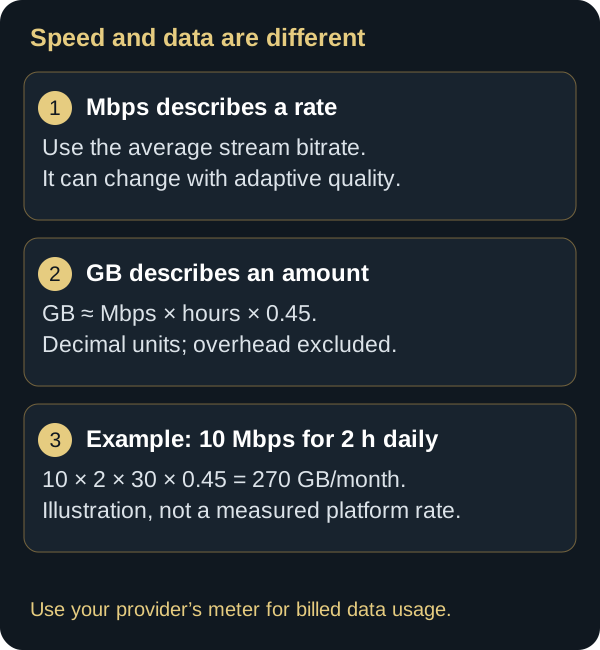
If the plan is not unlimited, use the provider’s official meter. For a rough estimate, multiply average megabits per second by time and convert bits to bytes. Ten constant Mbit/s is approximately 4.5 GB per hour before some overhead. Actual usage changes with adaptive quality, codecs, and scene complexity.
Do not reduce every screen automatically. Identify the main displays, select quality appropriate to them, and enable provider alerts. Updates, backups, and downloads also count.
Related guide: For a seasonal stay, plan the data budget and on-site checks with the IPTV at the cottage guide.
12. Network security and privacy
- Replace default gateway administrator credentials.
- Use a long, unique Wi‑Fi passphrase and the security mode recommended by the manufacturer.
- Apply official updates to routers and streaming devices.
- Use a guest network when properly supported.
- Disable remote administration unless it is required.
- Do not publish IP addresses, full MAC addresses, network names, or unredacted settings.
A VPN does not add line capacity or repair weak Wi-Fi. A changed route may improve performance or avoid certain traffic restrictions; server load, distance and encryption can also reduce speed. Compare the same device and service with and without the VPN. A gain alone does not establish ISP throttling. Follow service terms and evaluate privacy separately.
13. Frequently asked questions
Is 50/10 Mbps enough?
It is Canada’s baseline high-speed objective, not a guarantee for every household. It can support many uses, but concurrent streams, actual delivery, and the internal network decide the outcome.
Do I need gigabit service?
Not automatically. A large household and frequent large transfers may benefit. For one screen, fixing Wi‑Fi or selecting a more consistent access technology may matter more.
Is fibre always better?
Fibre to the home generally has strong characteristics, but compare price, upload, terms, installation, and Wi‑Fi. Confirm that fibre reaches the dwelling.
What speed does 4K need?
Consult the service. Apple recommends 25 Mbps for its 4K playback, excluding other household use. Add headroom and test concurrent screens.
Why is the speed test fast while video buffers?
The test and platform use different endpoints and paths. Wi‑Fi, loss, jitter, the device, app, or service may be responsible. Follow the chain before upgrading.
14. A worksheet for sizing the household

List each use that can genuinely occur in the same period. For video, use the platform’s published requirement instead of an invented number. For remote work, calls, and games, consult the relevant application documentation. Add those needs and leave reasonable reserve. Headroom absorbs changing encodes and background work; it cannot make an unstable link reliable.
| Concurrent use | Requirement source | Real measurement | Priority |
|---|---|---|---|
| Main screen | Service documentation | At the television | High |
| Second screen | Actually selected quality | In the second room | Household-specific |
| Video call | App documentation | Upload and latency | High for remote work |
| Cloud backup | Cloud settings | Upload load | Schedulable |
| Console | Separate updates from play | Loaded latency | Variable |
If total demand rarely approaches capacity, scheduling large transfers may cost less than a plan upgrade. If concurrent loads are daily, more capacity and proper queue management become relevant. Record the rationale so it can be revisited when the household changes.
15. Measure during peak use without misreading the results
The CRTC’s 2020 report defined weekday peak hours as 7 p.m. to 11 p.m. for its study. That window is a useful reference, but your peak may differ. A night-shift household or weekend viewer should measure the actual routine.
Use the same device, cable or location, and test endpoint where possible. Record median, minimum, maximum, and interruptions. Compare with the gateway result. A difference isolated to one room points indoors; a difference present over Ethernet at the gateway supports a provider discussion.
What a speed test does not prove
- It does not guarantee the route to a specific platform.
- It does not establish performance at every hour.
- It may not expose a television’s limited network port.
- It cannot separate the access line from Wi‑Fi when run wirelessly.
- It does not replace an outage log.
16. Adapt the network to the dwelling
Apartment or condominium
Nearby networks increase radio activity. Do not pick a channel at random; measure first. A gateway inside an entrance utility cabinet may poorly cover the living room. A discreet cable or properly connected access point may outperform an unplanned repeater.
Multi-storey house
Floors, ducts, and walls change propagation. Place the gateway centrally if wiring permits. In a mesh, each node needs a strong backhaul; Ethernet between nodes is often the most predictable option when feasible.
Rural or northern location
Availability may depend on fixed wireless or satellite. Plan for power, antenna sight lines, weather response, and repair times. A mobile backup can help where coverage and the plan permit, but test and secure it before an outage.
17. Provider gateway or personal router
The provider gateway usually simplifies installation and support. A personal router may expose advanced controls but adds configuration and can create double routing if connected incorrectly. Before changing, ask what remains supported, whether managed television or telephone service is affected, and how to restore the original setup.
Record model, firmware, networks, address reservations, and parental controls. Export a configuration only when the manufacturer supports it and protect the file. Do not blindly restore an old model’s settings to new hardware.
18. Prioritization and queue management
Features called QoS, priority, or optimization can help when a transfer monopolizes a limited link. They do not create capacity, and an incorrect line-rate value can worsen performance. Use them only with a rollback plan and compare latency and playback under identical load.
Prioritizing the television should not make an important call unusable. Define the outcome: stable playback while interactive traffic remains responsive. Balanced management is usually better than permanent absolute priority.
19. Prepare a useful provider support record
- Account, service address, and plan—kept private.
- Gateway model and indicator state.
- Exact dates and times of interruptions.
- Ethernet results at the gateway and measurements at the TV.
- One-device results and normal-load results.
- Ticket numbers and actions requested by support.
Report “three interruptions between 8:10 and 8:35 p.m.” instead of “the internet is bad.” If a technician changes wiring or hardware, repeat the same tests. Return replaced equipment according to provider instructions to avoid possible charges.
20. If service does not match the agreement
Begin with the provider’s escalation process and request a traceable response. The CRTC Internet Code explains rights that apply to customers of covered providers. If the matter remains unresolved, the Commission for Complaints for Telecom-television Services handles certain telecom and television complaints. Verify its current mandate and assemble contracts, bills, correspondence, and case numbers.
Do not present a wireless result as conclusive evidence of a line fault. Include a wired measurement when reasonably possible. Conversely, a repeatable outage record should not be dismissed solely because one spot test succeeded.
21. When hardware replacement is justified
An equipment purchase becomes reasonable once the constraint is localized: inadequate coverage despite sound placement, too few ports, hardware without security support, or a required feature that is absent. Check provider compatibility, home dimensions, client capabilities, security standard, and update policy.
Wi‑Fi 6, 6E, or 7 does not automatically create better video. The client must support the band and standard, while distance and obstacles still matter. A well-placed access point can outperform an expensive router left in a basement.
22. Final checklist
The best decision is not necessarily the costliest plan. It is the plan that meets measured use over technology that reaches the address, supported by a properly designed internal network and understood terms. Revisit the decision after adding a screen, moving, changing remote-work patterns, or receiving a material provider change.
23. Plan for outages and service continuity
No residential connection should be treated as infallible. Decide what the household needs during an outage before one occurs. Entertainment can wait, while remote work, accessibility services, medical communication, or security monitoring may require a defined backup. A mobile hotspot can provide temporary access where cellular coverage and the plan allow it, but video can consume its allowance quickly. Confirm tethering terms, secure the hotspot, and test only long enough to know it works.
Keep the provider’s support number, account reference, gateway restart instructions, and outage-status page available without relying on the affected connection. A small uninterruptible power supply may keep networking equipment online during a brief electrical interruption, but it cannot restore a provider network that has also lost power. Match any backup power device to the gateway’s electrical requirements and follow the manufacturer’s safety guidance.
For downloaded or offline media, verify in advance whether the application supports it, how long access remains valid, and how much storage is needed. Do not assume a title will remain playable without authentication. Continuity planning should reduce disruption, not encourage bypassing service controls.

24. Check the television and streaming device before upgrading the plan
The endpoint can be the bottleneck. Some televisions have 100 Mbps Ethernet ports, older Wi‑Fi radios, limited memory, or applications that no longer receive updates. A speed test on a newer phone beside the television does not prove that the TV can use the same radio standard or antenna performance. Compare the television’s documented network capabilities and, when possible, run the service on a second supported device.
Picture problems are not always network problems. HDMI negotiation, HDCP, HDR mode, frame-rate switching, audio formats, storage pressure, heat, and application state can all affect playback. A black screen without a loading indicator points more strongly toward the display chain than toward bandwidth. A steady reduction in resolution with a loading spinner points more strongly toward delivery or decoding, but still requires comparison.
Keep device firmware and the official application current. Before clearing application data or performing a factory reset, record sign-in and accessibility settings and understand what will be removed. A factory reset is a last diagnostic step, not routine maintenance.
25. Include accessibility and household usability in the decision
A connection that is technically fast but difficult to use is not a complete solution. Test caption loading and synchronization, audio description, interface language, remote-control response, and screen-reader behaviour where needed. Captions may arrive as a separate data track, while the application and content provider determine their availability. A missing caption track is not normally repaired by purchasing more bandwidth.
For bilingual Canadian households, test both English and French interfaces, metadata, audio tracks, and captions. Catalogue availability and language options can differ by title and platform. Record the device, app version, title, and selected language before contacting support.
26. Compare the full lifecycle cost, not the promotional month
Calculate the expected cost over the period you are likely to keep the service. Include the regular price after discounts, gateway or extender rental, installation, activation, required hardware, and potential cancellation or non-return charges. Then compare that total with the value of the capacity you can actually use. A discounted high-speed tier may become costly after the promotion, while purchasing unnecessary mesh nodes can add expense without fixing a provider-side issue.
Ask what happens when a promotion ends and whether accepting a new offer changes the term. Keep the critical information summary and each order confirmation. When returning equipment, follow the specified method and retain tracking or a receipt. These records are useful if a charge appears later.
Signals that an upgrade may be justified
- Wired measurements repeatedly approach the current tier during legitimate concurrent use.
- Loaded latency rises when routine uploads or downloads run, even after sensible scheduling.
- The provider offers a more suitable access technology at the address.
- Remote work, accessibility, or household growth has materially changed requirements.
Signals that an upgrade may not solve the problem
- Only one room or one client is affected.
- Ethernet playback is stable but Wi‑Fi playback is not.
- Only one application or one title fails.
- The symptom is an HDMI error, app crash, or unsupported format.
- The current tier is largely idle when the interruption occurs.
This separation protects the budget and improves support conversations. Upgrade when evidence shows a capacity or access-technology constraint; repair placement, wiring, device, or application issues when the evidence points inside the home.
27. Conclusion: choose using measurements
Choose using repeated measurements and actual household needs. Keep the seven-day test results, plan terms and useful settings. If playback remains unstable, compare devices and connections before replacing hardware or paying for more speed.
28. Scope and limits of this guide
This guide provides a method for comparing connections and troubleshooting a home network. It does not measure service at your address or guarantee an offer’s availability, speed or service quality. Results depend on factors including the provider, access technology, load, dwelling and devices. Check current terms with the provider and repeat measurements in your own environment.
29. Sources and editorial method
Editorial and technical review: September 16, 2026. Source-based review and web checks; no household field measurements or provider certification are claimed. New photographs are AI-generated illustrations.
- Proton VPN — factors affecting VPN speed (provider documentation)
- Netflix — recommended connection speeds
- CCTS — complaints within its mandate
Primary references reviewed August 4, 2026: CRTC — internet performance and reliability; CRTC — Measuring Broadband Canada; CRTC — 2020 measurement report; CRTC — Internet Code; ISED — National Broadband Data; ISED — High-Speed Internet for All; CCTS — internet complaints; Apple — streaming troubleshooting; Apple — 4K requirements. Offers and interfaces change; always confirm the address, contract, and current service documentation.
Editorial update and further reading: