

1. Quick answer: where should you start in Canada?
To prepare streaming in Canada, first ask the provider to qualify your exact address. Compare the technology, total price and included data, then test at the gateway and television during normal viewing hours. A provincial average or a covered area on a map does not guarantee service in your unit. Check language, captions and your community’s time zone too.
2. Introduction: your address before your province
Canada combines large metropolitan areas, suburbs, farms, coastal settlements, northern communities, and remote homes. Two households in one province may receive different technologies, speeds, equipment, and contract terms. Provincial context helps people ask better questions, but it never proves that a plan is available in a building, along a rural road, or in a particular community.
This guide covers all ten provinces and three territories without ranking providers or inventing address availability. It uses the National Broadband Map and official material from the CRTC, Innovation, Science and Economic Development Canada, and the National Research Council. Availability data changes, so the verification date and full service address remain essential.
3. Key takeaways
- Qualify the complete address, including the unit, before ordering.
- Separate announced infrastructure from a connection available today.
- The national 50/10 benchmark is not a playback guarantee at the TV.
- Test simultaneous usage and Wi‑Fi in the viewing room.
- Keep the terms, dated measurements and exact local time zone.
4. Your next steps by dwelling
Apartment
Confirm the exact unit and usable outlets. Test Wi‑Fi in the television room with doors closed and normal household activity.
Rural home
Ask which technology will actually be installed. Confirm outdoor equipment, installation conditions and the outage procedure.
Remote community
Compare data allowances, available capacity, support and repair arrangements. Plan updates and video quality around measurements in the home.
Aggregated coverage data is not a guarantee of service at your unit. An announced project and an available connection are different things. The Canadian 50/10 benchmark concerns Internet access, not Wi‑Fi performance in every room or one application’s playback quality.
References: ISED — broadband data limitations and CRTC — universal service objective.
5. Understand the national 50/10 benchmark
The CRTC’s universal service objective includes access to fixed broadband at 50 megabits per second download, 10 Mbps upload, and an unlimited-data option. It is an access benchmark, not a promise that every subscriber receives the maximum speed at every hour or a statement that every household has identical needs.
The federal High-Speed Internet Access Dashboard distinguishes coverage data from deployment targets. Check the reference year: a page update date is not the date of the underlying measurement. Innovation, Science and Economic Development Canada (ISED) uses aggregated coverage areas; an address within a displayed area may still be unserved.
6. Verify service at four levels

- Use the National Broadband Map to identify technologies and projects around the community.
- Ask each potential provider to qualify the complete address, unit, and postal code.
- Obtain written confirmation of technology, speeds, data, charges, and equipment.
- Test the delivered service during the contract’s applicable trial period rather than relying on advertising.
Street availability does not confirm wiring to an apartment unit. A rural road segment does not prove line of sight, copper length, tower capacity, or final installation. For satellite service, check the sky view, mounting requirements, power, mobility restrictions, and data management.
7. Separate fibre, cable, DSL, fixed wireless, and satellite

| Technology | Verify | Common misunderstanding |
|---|---|---|
| Fibre to the premises | Terminal, gateway, downstream and upstream profile | “Fibre” may describe only part of the network |
| Cable | Provisioned profile, local load, upstream channel | Advertised speed is not a television measurement |
| DSL | Loop length, profile, inside wiring | Nearby homes can receive different rates |
| Fixed wireless | Line of sight, band, antenna, capacity | A coverage map is not a signal guarantee |
| Satellite | Sky view, latency, data, installation | Weather and capacity management can matter |
| Mobile broadband | Indoor signal, tethering, cap, priority | Signal bars do not measure sustained throughput |
A fast result at the modem can still produce poor playback if Wi‑Fi crosses several walls, the player is hidden, the channel is congested, or a repeater reduces capacity. Test the outside service separately from the home network.
8. Size the household, not one screen
Count simultaneous streams, video calls, backups, games, downloads, and smart devices. Actual requirements depend on the service and format in use. Headroom helps, but buying the largest plan does not correct a poorly placed router. Upload capacity matters for remote work, cameras, and cloud backup.
Unlimited data removes the need to count every hour, but a contract may still contain traffic-management terms. For a limited plan, use the provider’s meter and measure a representative week. Do not interpret “unlimited” as a promise that no network policy exists.
9. Measure at the gateway and television
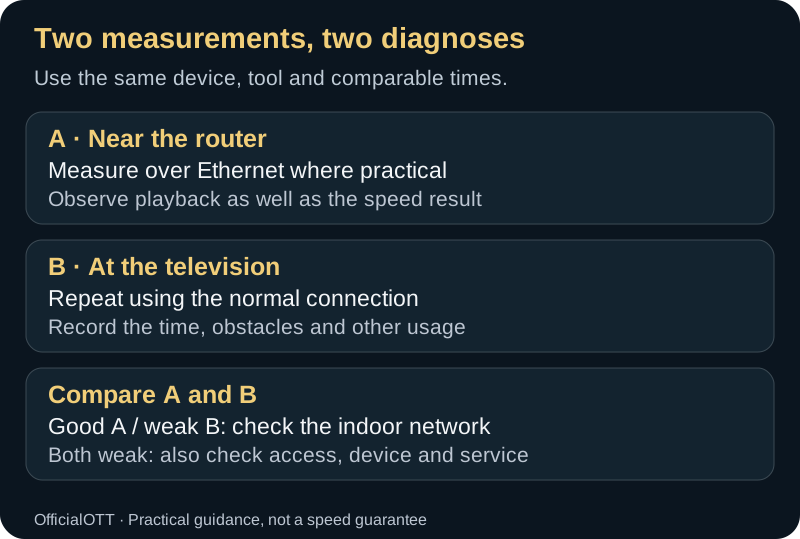
Measure over Ethernet where practical
Observe playback as well as the speed resultRepeat using the normal connection
Record the time, obstacles and other usageGood A / weak B: check the indoor network
Both weak: also check access, device and serviceBegin with Ethernet or a reliable device near the router. Repeat at the television at the same time without changing several variables. Record download, upload, latency, variation, and loss, then test known authorized content. Consistency is often more useful than one peak result.
If the gateway test is weak, investigate service, modem, or the outside link. If it is strong and the television test is weak, examine placement, bands, Ethernet, mesh, and wiring. If measurements are good but playback fails, check the app, player, formats, source, and audio-video path.
10. Time zones, program guides, and daylight saving time
Canada spans several time zones and includes regional exceptions. The National Research Council notes that time rules are generally set by provinces and territories. Most regions change clocks seasonally, while most of Saskatchewan uses Central Standard Time year-round, Yukon uses UTC‑7 throughout the year, and Nunavut spans three time zones.
Use automatic time and zone settings when the device recognizes the locality correctly, then verify program-guide alignment around seasonal changes. A one-hour shift may originate in the operating system, app, or EPG data. Do not add a manual offset until you know which layer already applied the adjustment.
11. Climate, power, and physical installation
Cold weather outside does not cool a player trapped in a closed cabinet. Leave ventilation around the gateway and streaming device. Keep them away from heating vents, hot television panels, and overloaded power bars. A compatible uninterruptible power supply can keep networking equipment running through brief disruptions, but it must be sized and operated according to its manufacturer.
Outdoor fixed-wireless and satellite installations must account for snow, ice, wind, trees, and safe access. Do not climb onto a roof during a storm. Document the demarcation point and cable path so support can separate indoor equipment from an outside-link issue.
12. English, French, and accessible support
A bilingual household should retain the exact menu names in the displayed language. A short EN‑CA/FR‑CA sheet can record model, versions, connection type, and completed tests without passwords. When contacting support, specify the interface language and copy the exact error message.
Before choosing service or hardware, check the language of the contract, support, interface, captions, and documentation. When accessibility matters, test text size, contrast, screen readers, voice controls, captions, and the remote during the applicable trial period.
13. Read the Internet contract

The Internet Code is intended to make contract information clearer. Review the monthly price, promotion end date, one-time charges, equipment, installation, data, outage policy, cancellation, and hardware-return conditions. Keep the offer and contract summary from the day of acceptance.
The CRTC directs subscribers to approach the provider first and then the CCTS when necessary. Build a complaint file with dates, case numbers, reproducible measurements, and the requested resolution. Do not post a complete bill or account identifiers publicly.
14. Move without assuming availability

A plan at the old address may not exist at the new one, even in the same city. Confirm the unit, activation date, appointment, wiring, and charges. A remote worker may need an authorized temporary connection or overlap period.
Photograph cabling without sensitive labels, return provider-owned equipment, and keep proof. Reset personal devices only after the replacement service works. Update billing information separately from marketing preferences.
15. Rural, remote, and northern locations

Federal programs seek to close access gaps, but an announced project is not the same as an orderable service. The dashboard separates current availability, program funding, and projections. Check project stage, recipient, technology, and expected timing, then qualify the address directly.
In a satellite-dependent community, shared transport capacity can affect many households. Schedule large updates, choose appropriate quality settings, and retain lawful offline media for disruptions. These constraints should not be presented as identical to those on an urban wired network.
16. Regional security and privacy
Location does not change the basic controls: unique passwords, MFA, patched routers, official apps, redacted screenshots, and verified support channels. Provincial context may affect the privacy law applicable to an organization. Check official resources relevant to your province.
Send only information required to qualify or support service. A public availability map does not justify publishing a full address. When sharing a speed result, remove the public IP address, exact server, account number, and details that unnecessarily profile the household.
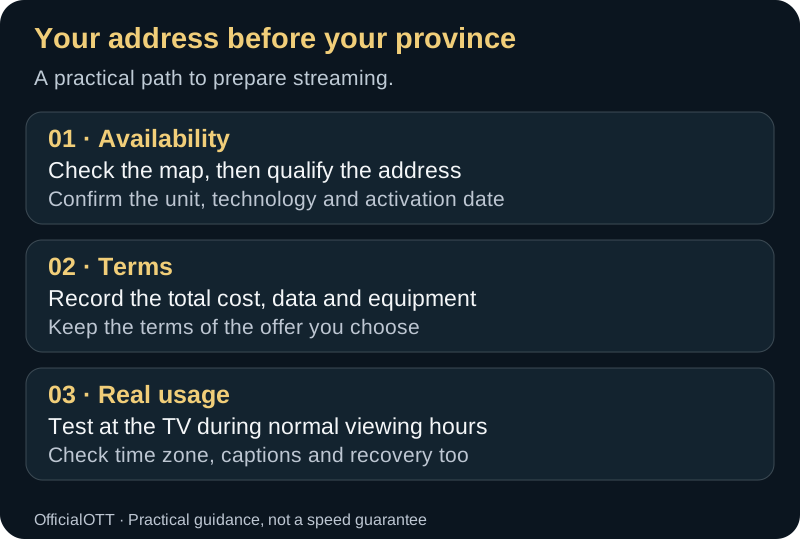
Check the map, then qualify the address
Confirm the unit, technology and activation dateRecord the total cost, data and equipment
Keep the terms of the offer you chooseTest at the TV during normal viewing hours
Check time zone, captions and recovery too17. A repeatable comparison method
- Write down household needs and simultaneous uses.
- Check the national map, then qualify the address with multiple providers.
- Compare technology, speed, data, total price, equipment, and support.
- Save the terms and date of each offer.
- Install without changing every default at once.
- Measure near the router and television for seven days.
- Accept, correct, or cancel based on evidence and applicable terms.
18. Ten provinces and three territories

Ontario
Qualify the exact unit in the urban corridor, agricultural areas, and Northern Ontario. A building can contain several network operators, while a rural property may depend on DSL, fixed wireless, or satellite. Parts of western Ontario use Central Time. Measure latency to services the household actually uses rather than only the nearest test server.
Quebec
Request contracts, support, and documentation in the language needed by the household. Montréal, regional centres, coastal communities, and the North have different connectivity contexts. Some areas east of 63 degrees west use Atlantic Time for some or all of the year, so do not apply Montréal’s zone automatically to the entire province.
British Columbia
Mountains, valleys, islands, and long distances can influence technology choices. Verify actual building wiring in Vancouver and exact radio conditions in interior communities. Geography and line of sight matter for fixed wireless. Since March 8, 2026, most of British Columbia stays on UTC−7 year-round: clocks will not move back on November 1, 2026. Some northern communities and parts of the Kootenays follow different local rules. For a live event, confirm your community’s time and the broadcaster’s advertised time zone. See the official British Columbia time rules.
Alberta
Compare the urban, exurban, or rural address rather than an Alberta average. Farms and remote properties may require an outdoor installation or backup service. Measure during household peak periods and review upload capacity for work, cameras, and backups.
Saskatchewan
Most of the province remains on Central Standard Time year-round, while the Lloydminster area follows Mountain Time with seasonal changes. A poorly configured guide may shift as a result. In rural areas, confirm the technology and data allowance, then compare Ethernet and Wi‑Fi before blaming an interruption on the provider.
Manitoba
Winnipeg and a remote community may have very different options. Do not confuse an announced project with immediate activation. Plan router location, cabling, and power for a long or isolated home. Measure in the evening and retain dated copies of results.
New Brunswick
A bilingual household may prioritize contract and support language. Urban, rural, and coastal areas still require address qualification. Test router placement in multi-storey homes. Atlantic Time should agree across the operating system, application, and program guide.
Nova Scotia
Coastal geography and dispersed settlements make province-wide generalizations unreliable. Confirm equipment, technology, and outage terms. For a seasonal property, review suspension, reactivation, account status, and moisture protection. Sign out or disconnect devices while the property is empty.
Prince Edward Island
A small province is not uniformly served on every rural road. Begin with the national map and obtain an address qualification. Compare total cost, installation, and promotion length. In seasonal rentals, protect television accounts and reset shared devices between occupants.
Newfoundland and Labrador
The island of Newfoundland and Labrador present different distance and transport realities. Newfoundland Time includes a half-hour offset, so a generic Atlantic setting can produce an incorrect guide. Confirm the locality, outside equipment, technology, and outage process before relying on the connection for essential work.
Yukon
Yukon has used UTC‑7 year-round since 2020. Correct an automatic seasonal change if a platform fails to recognize that rule. At a remote address, distinguish current service from planned projects and account for fixed-wireless or satellite dependencies. Document what to do during a power outage.
Northwest Territories
Distance, transportation, and regional capacity can affect installation and repair. Ask whether the service depends on terrestrial or satellite facilities and how data is managed. Schedule important updates carefully and record support contacts. An aggregated map still does not confirm every dwelling.
Nunavut
Nunavut spans three time zones, and Southampton Island stays on Eastern Standard Time year-round. Use the exact community when configuring a guide. Many communities depend on satellite transport, where latency, capacity, and data terms differ from southern wired networks. Choose suitable quality settings and retain lawful local alternatives for outages.
19. Seven-day acceptance protocol
- Day 1: contract, gateway, technology, and wired baseline.
- Day 2: television Wi‑Fi and simultaneous devices.
- Day 3: evening peak and extended playback.
- Day 4: upload, video call, and backup.
- Day 5: restart, brief interruption, and recovery.
- Day 6: captions, audio, guide, and time zone.
- Day 7: compare evidence with terms and document the decision.
Use the same device, location, and measurement tools. Record household changes during each test. One result does not establish a trend. If the contract provides a trial period, calculate its deadline at activation and keep the necessary evidence.
20. Build a regional support file
| Record | Do not publish |
|---|---|
| Province, general community, housing type | Complete address |
| Confirmed technology | Gateway identifiers |
| Date, time, and zone | Public IP address |
| Gateway and television measurements | Wi‑Fi password |
| Internal case number | Complete invoice |
Ask the provider to distinguish a declared outage, signal to the property, modem, inside wiring, and Wi‑Fi. If neighbours are also affected, record that fact without collecting their personal information. Community reports can suggest a hypothesis, but the provider’s status page or case remains the source to verify.
21. Frequently asked questions
Which province has the best Internet?
A provincial average cannot answer for a home. Compare technologies and measured service at the address.
Is 50/10 always sufficient?
It is a national access objective. Real requirements depend on simultaneous use, upload, Wi‑Fi, and the selected service.
Does the national map guarantee my address?
No. ISED explains that coverage is aggregated and a displayed area may contain unserved homes.
Why is the guide one hour wrong?
Check locality, time zone, daylight saving, operating system, app, and EPG data before adding a manual offset.
What if measured performance does not match the offer?
Document reproducible tests, contact the provider first, then review the applicable complaint process and the CCTS if required.
22. Apartments, condominiums, and rentals
A network serving the building does not mean every suite is ready. Ask which providers have access, where the demarcation point is, whether an outlet is active, and who may approve new cabling. Do not drill through walls or move common equipment without permission. In a condominium, distinguish building rules from the provider’s contract.
Test in the room where service will be used, with doors closed and the household’s normal devices active. Concrete, metal, heated floors, and neighbouring networks can weaken Wi‑Fi. A wired access point is often more predictable than a chain of repeaters. Before buying mesh hardware, confirm electrical outlets, backhaul paths, and whether Ethernet can be used.
In a rental, record equipment belonging to the owner and equipment belonging to the service provider. Do not reset a shared gateway without authorization. At the end of the lease, remove personal accounts, profiles, pairings, and remembered networks. Keep proof that rented hardware was returned so that a later charge is not assigned to the wrong occupant.
23. Plan for outages and recovery
Entertainment can wait, while remote work, emergency alerts, and family communication require a separate continuity plan. Record the provider’s outage channel, phone battery options, and places where an authorized connection remains available. Download essential documents and lawful offline media in advance. Do not bypass tethering rules or public-network portals.
A UPS can power the gateway, router, and a small terminal during a brief outage, but not necessarily the television. Calculate load, test runtime, and replace the battery according to the manufacturer. Fibre can still be unavailable if customer equipment loses power, and a battery does not guarantee that the provider’s outside facilities remain operational.
After power returns, let equipment start in order: terminal, modem or gateway, router, access points, and then clients. Verify the clock before diagnosing the program guide. When the incident is regional, avoid factory resets that erase a valid configuration and make recovery more difficult.
24. Compare the twelve-month cost
A promotional monthly price may not represent annual cost. Add activation, installation, equipment rental or purchase, promotional months, regular months, taxes, and applicable charges. Record the discount end date and cancellation process. Compare equivalent service levels that are actually available at the same address.
Include the cost of the inside network. A faster plan may not improve the television when coverage is the bottleneck. A properly located wired access point or Ethernet installation can be a useful one-time expense. Do not recommend a purchase until gateway and television measurements identify the weak link.
For a second home, review seasonal suspension, reactivation charges, equipment returns, and whether the address remains reserved. For capped service, estimate consumption from a representative week instead of an unusual day. Date every price because an undated comparison quickly becomes misleading.
25. Indigenous communities and local context
A First Nations, Inuit, or Métis community should not be reduced to a technical category. Projects, providers, ownership models, languages, infrastructure, and priorities differ by place. Consult information published by the community and authorized representatives, then verify the relevant federal map and program. Do not announce availability on behalf of a community.
When capacity is shared or constrained, schedule downloads, updates, and backups in accordance with network policy. Responsible optimization means selecting appropriate quality, avoiding simultaneous updates, and using authorized local storage—not circumventing management. Anonymize measurements before publishing them.
Support should respect the chosen language, time zone, hours, and communication channel. Do not demand a video of a home when measurements and an error message are sufficient. When a visit is necessary, agree on the appointment and accessible information. Recommendations should be developed with local context rather than copied from a major urban centre.
26. Create a household demand profile
List each recurring use, its time window, and whether it is essential. A household may have two evening streams, one daytime video call, cloud backup overnight, gaming on weekends, and security cameras throughout the day. This profile is more useful than counting devices because many connected products consume almost nothing while an active upload can use substantial capacity.
Identify what happens when demand overlaps. A router with good traffic management can keep a call responsive while a download continues, but the total connection and Wi‑Fi still have limits. Test the overlap deliberately with authorized content. Do not enable unfamiliar “gaming,” “boost,” or priority modes without recording the original setting and understanding which device receives preference.
Revisit the profile after a move, new work arrangement, additional television, or change in household size. Reduce or increase the plan only after current measurements show a sustained need. This approach avoids paying for unused capacity and prevents an undersized upload from being overlooked.
27. Installation-day checklist
Before the technician arrives, identify the desired gateway location, available power, television room, and acceptable cable path. Keep pets and private paperwork away from the work area. Ask before approving holes, exterior mounting, or changes to existing wiring. Record the model and ownership of every installed device without photographing passwords or serial numbers unnecessarily.
Before the appointment ends, confirm that the service is activated under the correct account, the wired baseline is reasonable, Wi‑Fi reaches the intended room, and the provider’s management app works. Ask how to report an outage, return equipment, change the network name, and obtain accessibility support. Do not sign a completion statement for an untested installation.
Afterward, replace any temporary administrator password, store documents securely, and test again during evening use. If the installer made an exception or promised follow-up work, obtain a case number and written description. A clean installation record makes later troubleshooting faster and safer.
28. Interpret measurements without overstating them
A speed test is a sample between one client and one server. It can be influenced by the device, browser, protocol, server load, Wi‑Fi, and other household traffic. Record the tool, server region, connection type, time, and device. Repeat a small number of comparable tests instead of running dozens until one produces the desired number.
Latency is not a single property of a province. It changes with route and destination. Measure toward the real service when an official diagnostic exists. Packet loss and variation can explain poor calls or playback even when average download speed looks high. A wired result provides a baseline but does not represent every wireless room.
Present results as observations, not universal claims. “This address measured X under these conditions” is defensible; “this provider is fastest in the province” requires a much broader and current methodology. Keep that distinction when comparing offers so the decision rests on evidence rather than unsupported rankings.
29. Conclusion: prepare the connection in your own home
Across Canada’s ten provinces and three territories, start with a qualified address and written terms. Choose a technology available in the dwelling, account for simultaneous usage and compare the gateway connection with the television. Then adjust the indoor network, time zone and playback settings. Keep dated evidence for decisions and support.
30. Scope and limits of this guide
This preparation method does not certify coverage at an address or rank providers. Regional examples are not speed measurements or field tests in every province. Confirm current availability, contracts and local requirements before deciding.
31. OfficialOTT verification and method
Editorial review: . This revision checks structure, cited technical guidance, internal links and metadata consistency.
Official-source checks: the national 50/10 objective, ISED mapping limitations and National Research Council time-zone guidance.
Not tested by OfficialOTT in your home: throughput, coverage, latency or playback stability. The procedures are diagnostic recommendations, not laboratory results. Photographs are illustrations, not evidence of an exact product’s capabilities.
Editorial responsibility: OfficialOTT — team and method. To suggest a correction, contact us with the passage and its source.
For an island household, see the Prince Edward Island guide to Internet and local content.
33. Official sources and editorial method
Sources reviewed August 4, 2026: CRTC — role, 50/10 objective, and unlimited option; ISED High-Speed Internet Access Dashboard; National Broadband Map; broadband data methodology and limits; CRTC Internet Code; National Research Council time zones and daylight saving time. Address and provider details require confirmation at the time of decision.